How I Saved £500 a year…by removing Apache?
Chris Board
02/11/2026•8 min readNow you might be asking, how can I possibly be saved £500 a year by removing Apache, Apache is free, it doesn’t cost anything to run it, and you’d be right. But there was a very specific reason.
Before we get into the how, first need to take a look at how my deploy my services. This is shown in a diagram below:
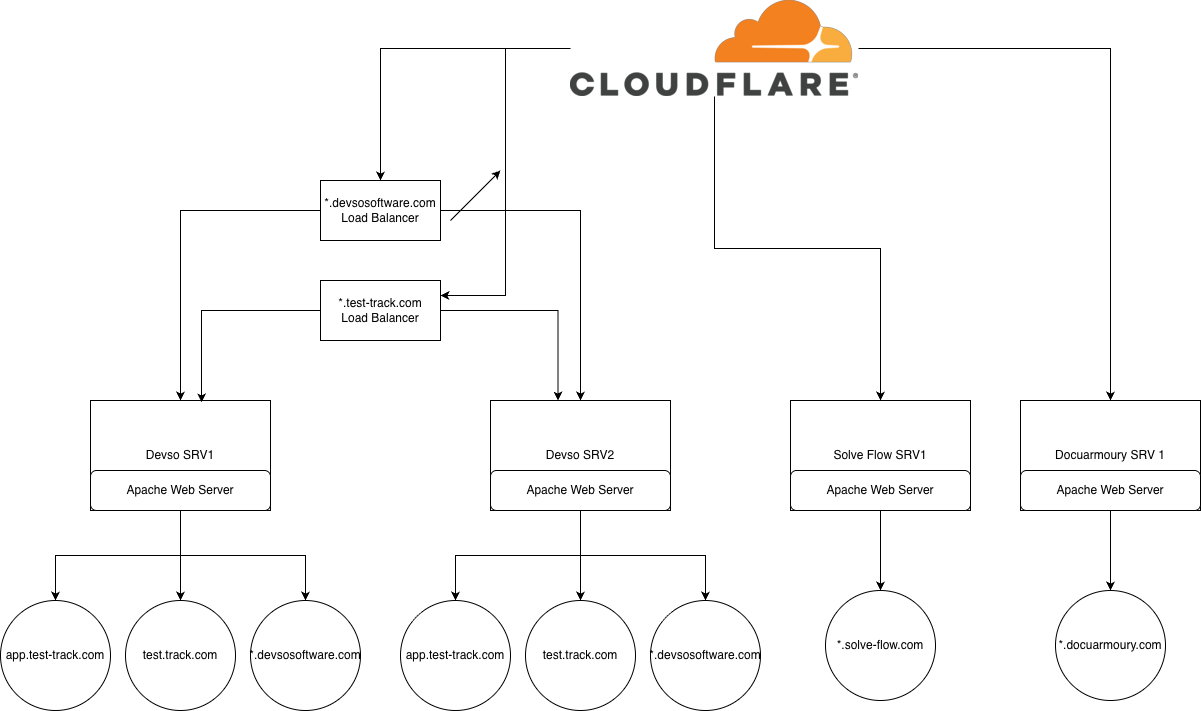
All of our web traffic goes through Cloudflare, and then depending on the site determines whether it goes through the load balancer or to a server directly. No matter what server it hits, though whether that’s via the load balancer, or directly to a server, the web site is servers by Apache, and Apache acts as a reverse proxy to my backend application, which most of the time is a NextJS application.
Devso Software and Test Track related domains are what I refer to as fixed or static domains, nothing else will access those sites or services by any other domain. The Solve Flow and Docuarmoury projects, although currently only used internally, are accessible from multiple domains. For example, Solve Flow is my support portal for my relevant projects, so app.solve-flow.com is pointed to via CNAME DNS records for support.test-track.com and support.devsosoftware.com. Docuarmoury is similar in that a DNS CNAME record points to app.docuarmoury.com for my documentation sites for my projects, such as docs.test-track.com.
This is an important distinction. For the static/fixed domains such as devsosoftware.com or test-track.com, for each part I have a vhost configured in Apache. This might look something like the below:
<VirtualHost *:443>
    ServerName test-track.com
    ProxyPass / http://127.0.0.1:3004/ KeepAlive=On connectiontimeout=300 timeout=300
    ProxyPassReverse / http://127.0.0.1:3004/
    Include /etc/httpd/ssl.d/test-track.conf
</VirtualHost>

<VirtualHost *:443>
    ServerName app.test-track.com
    ProxyPreserveHost On
    ProxyPass / http://localhost:3009/
    ProxyPassReverse / http://localhost:3009/
    Include /etc/httpd/ssl.d/test-track.conf
</VirtualHost>
This means for every domain and subdomain is recorded as a fixed domain that can’t change, and if something else come in that doesn’t match, it will either not be served, or will go to the first vhost in the config that is loaded in Apache.
This doesn’t work for Solve Flow or Docuarmoury. Although I could in theory added a Server Alias parameter to the vhost that would serve the app.docuarmoury.com or app.solve-flow.com, this would work initially for my own projects, albeit a bit of a pain each time, but the plan is eventually to make these services available, and its not practical to open this up, and everytime a new customer on boards a domain, I manually gointo the vhost to add their domain as a ServerAlias. So due to this, Docuarmoury and Solve Flow, are put on their own independent servers, with a default vhost that goes the main backend app, and a specific match for the top level domain for the landing page. i.e. solve-flow.com would have a vhost, but the app.solve-flow.com would use the default vhost.
This worked, but it meant paying for additional servers for very little benefit. Plus had the downside, each project had a single server, I needed to do maintenance such as server patching, meant that service was offline for the duration.
Now, before we get to Apache, you might be wondering why I had two load balancers pointing to the same 2 servers, just for different domains.
There was a bit of a legacy reason and/or maybe a misunderstanding on my part. When I first set up the Devso Software and Test Track domains, Test Track in particular, I used an authentication library that used session based cookies. This was fine, but it meant every request had to hit the same server post authentication, otherwise, they could log in against server 1, then the load balancer sends the request to server 2 and they are logged out. So I needed to ensure session stickyness.
This was done on the Digital Ocean load balancer by enabled sticky sessions, so it had to modify the request forwarded to the engine by adding a cookie to the response called DOLB with a value representing the server (droplet as they call it). That would ensure when the client browser received the request, they would get this cookie, and the cookie would be forwarded in all other subsequent requests, which the load balancer would check, and forward the request to the same server.
To do this, however, required providing the SSL certificate for the domain (or at least I believed it did, I’m not sure if that is the case) and the load balancer would only accept a single certificate, I could provide a certificate for Devso Software and Test Track, so I needed one load balancer for each domain certificate.
A while back though, I migrated from the library I was using to Better Auth. They’re preferred session management is database driven instead of session cookie based.
As both servers had the benefit of bi-directional replication, it meant both servers knew about the user session, so I no longer needed to maintain all requests to a single server, the load balancer could happily flick between servers and server knew who was authenticated for that session. I was therefore able to remove the SSL certificates and put the load balancer into pass through mode. This means, the load balancer, does care who the request is for, or any cookies, it will just forward whatever it receives to the origin server.
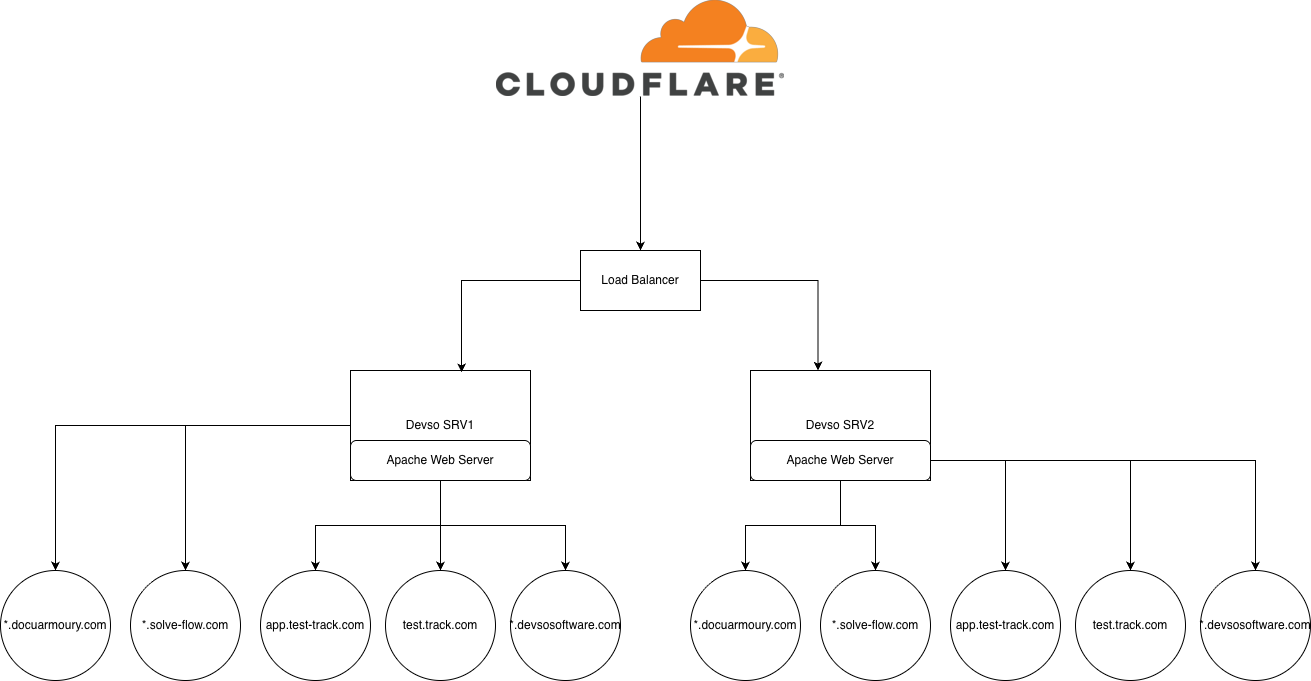
This means I could remove the second load balancer and point both my *.devsosoftware.com and my *.solve-flow.com to a single load balancer, that saved me some money straight away.
Now on to Apache. I wanted to save further money, I didn’t want to pay for 2 servers for just 1 project each and I also wanted to improve the resiliency to be able to patch a server without causing downtime for that particular service.
None of what I could find would allow custom domain matching to a specific reverse proxy with the correct certificate selection to allow the two primary Devso SRV1 and SRV2 servers to host both the static sites and the custom pointed to domains, so I built my own.
I decided to create a project with two parts, a frontend GUI to manage the domains, certificates and backends, and the main C# app that would make the routing decisions.
I found a library called YARP (https://github.com/dotnet/yarp) an open source project to create a reverse proxy and load on the fly based on the received domains, the correct backend to forward the request to and the correct certificate for that domain.
This is installed on each server via docker, and exposes port 443 from the host to the container service.
When the server receives a request from the Internet, via Cloudflare, the request hits my C# routing service, determines the domain the request came in, chooses the certificate that is required to be served for that domain, and forwards the request to the correct backend NextJS application for that domain, and then returns the response back to the client. Completely transparent to the user.
Currently the frontend is available via both servers (via an internal zero trust access not publicly over the Internet) but I plan on changing that slightly. I have another internal dashboard, which I refer to as the Devso Control Centre, which is where I monitor alarms that are generated by my projects, raise maintenance windows or incident reports against etc, so I plan on moving the frontend into this, but the one project does everything was a way of implementing it quickly as a proof of concept.
And it works perfectly well, in fact, if you are reading this on the Devso Software Blog, your request would have gone through this YARP routing service and below are the metrics of the requests going through the routing service.
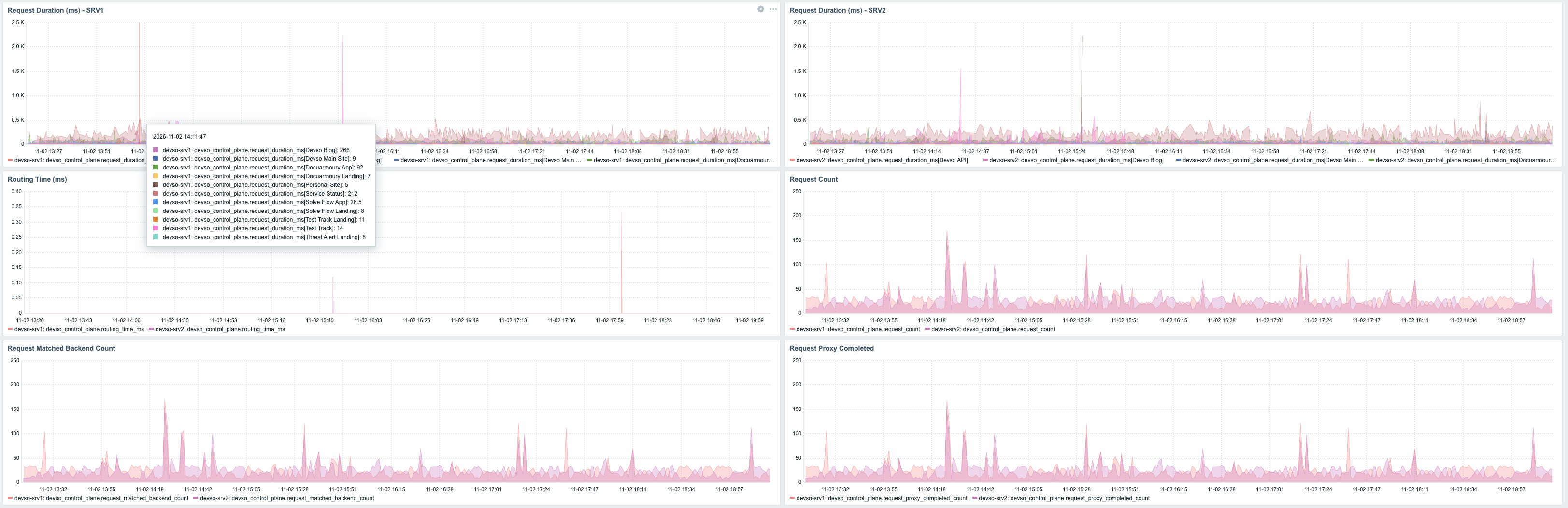
The idea eventually, when Solve Flow and Docuarmoury are ready for release to other users, when someone adds their domain to those services under their account, that service will send an API request to the routing service with the details so the routing service automatically reload and starts serving requests from new domains as they are added by other customers providing a fully automated routing platform.
This has meant, I’ve been able to move Solve Flow and Docuarmoury onto the Devso servers and remove those separate project based servers, and now all domains have replaced Apache by my own routing service. This means my architecture has been simplified as below:
What do you think, would you have done it differently, do you have any better suggestions let me know.